
If you're running VMware in 2025, you've probably noticed something: the licensing costs aren't just climbing, they're basically doing parkour at this point. Broadcom's acquisition threw gasoline on an already smoldering fire, and now CTOs everywhere are scrambling to find alternatives that don't involve a complete infrastructure rewrite or sacrificing features their teams depend on.
Enter VergeOS—a modern ultraconverged platform that consolidates compute, storage, and networking into one OS. It's not trying to be a VMware clone. It's rethinking virtualization from the ground up, and honestly? It's doing a pretty solid job of it.
Let's break down what you're actually getting (and giving up) when you make the jump.
The VMware Tax: It's Not Just About vSphere Anymore
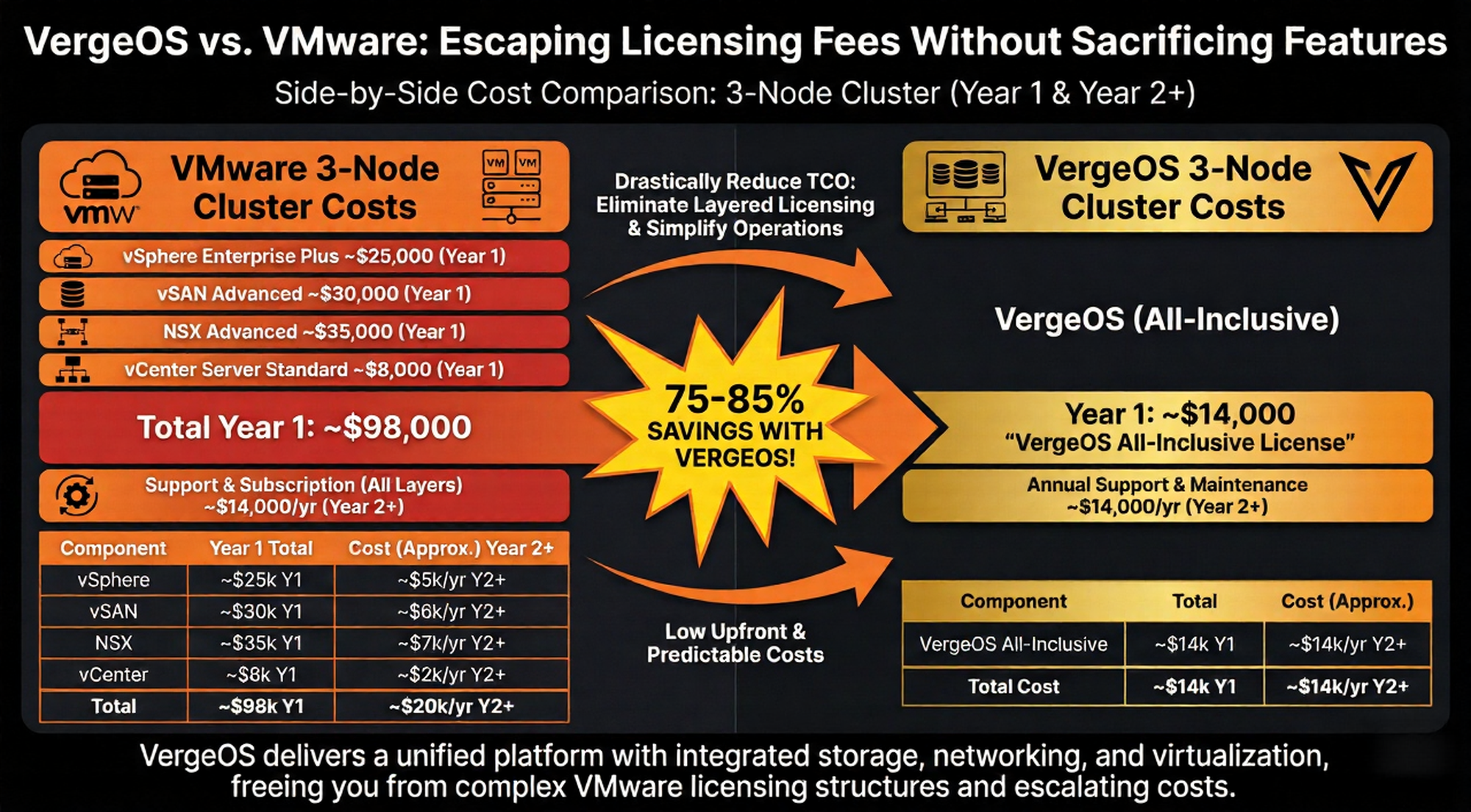
VMware's licensing model used to be straightforward. You paid for vSphere, maybe tacked on vCenter, and called it a day. But modern VMware deployments look more like this:
- vSphere (per-core licensing)
- vCenter (management plane)
- NSX (software-defined networking)
- vSAN (storage virtualization)
- vRealize (monitoring/automation)
- Site Recovery Manager (disaster recovery)
Each component comes with its own licensing structure, support contract, and upgrade cycle. A typical enterprise setup can easily run $500K–$2M annually depending on core count and feature set. And Broadcom's new per-core model? It's pushing some organizations into seven-figure renewals for infrastructure that was already paid off.
The real kicker: you're paying separately for features that should be part of the base platform. Software-defined networking shouldn't be a $50K add-on. Snapshots shouldn't require third-party tools. Multi-tenancy shouldn't need complex VLANs and firewall rules just to isolate workloads.
What VergeOS Actually Is (And Isn't)
VergeOS isn't a hypervisor bolted onto a storage layer with networking tacked on as an afterthought. It's an ultraconverged OS that treats compute, storage, and networking as first-class citizens in a single software stack.
Here's what that means in practice:
1. One OS, One License
VergeOS uses per-node licensing—not per-core, not per-VM, not per-feature. You license the physical server, and everything runs on top of it. Want to spin up 500 VMs? Go ahead. Need nested tenants with isolated networks? Built-in. Want snapshots at the VM, tenant, or environment level? Already there.
No surprise bills when you add cores. No separate NSX licensing when you need VLANs. No vSAN upgrade when you want erasure coding.
2. Native Software-Defined Networking
VMware's NSX is powerful, but it's also a separate product with its own learning curve, licensing fees, and operational overhead. VergeOS bakes SDN directly into the platform:
- Tenant-isolated networks with automatic VLAN assignment
- Virtual routers and firewalls without physical appliances
- Nested tenants for multi-customer environments (think MSPs or internal business units)
- Zero-trust segmentation at the network layer
You're not managing NSX controllers, edge nodes, or distributed firewalls. It's just... there. And it works.
3. Instant Snapshots (Not "Backup Solutions")
VMware's snapshot model is clunky. You take a snapshot, performance tanks, and you're supposed to delete it within 72 hours or risk storage bloat. Third-party backup tools (Veeam, Commvault, Rubrik) fill the gap, but they add cost and complexity.
VergeOS snapshots are:
- Instant (sub-second, copy-on-write)
- Hierarchical (VM-level, tenant-level, environment-level)
- Rollback-friendly (one-click restore to any snapshot)
- Storage-efficient (dedupe and compression built-in)
You can snapshot an entire tenant environment—VMs, networks, storage—and roll back the whole thing if a deployment goes sideways. Try doing that in vSphere without a small army of backup engineers.
4. Built-In Multi-Tenancy
If you're running a multi-customer environment (SaaS platform, MSP, internal IT for different business units), VMware makes you cobble together tenancy with:
- Complex VLAN tagging
- Separate vCenter instances
- Firewall rules and NSX segments
- Third-party orchestration tools
VergeOS has native tenant isolation. Each tenant gets:
- Its own virtual data center
- Isolated networks (with optional cross-tenant routing)
- Resource quotas (CPU, RAM, storage)
- Admin console access (without seeing other tenants)
You can even nest tenants inside tenants. Think: a parent MSP with child customers, each with their own internal departments.
The Migration Path: It's Not as Scary as You Think
Okay, so VergeOS sounds good on paper. But how do you actually get there without a six-month outage and a team of consultants?
VergeOS includes a VMware migration toolkit that handles the heavy lifting:
- VM conversion: Automated conversion from vSphere/ESXi to VergeOS format
- Network re-mapping: Translate VMware port groups to VergeOS virtual networks
- Staged rollback: Test VMs in VergeOS, roll back to VMware if something breaks
- Parallel operation: Run VMware and VergeOS side-by-side during migration
You're not doing a forklift migration. You're moving workloads in waves, validating each batch, and keeping VMware as a fallback until you're confident.
Most migrations take 4–8 weeks depending on VM count and network complexity. Compare that to a vSphere-to-Hyper-V migration (6–12 months) or a full Kubernetes replatforming (12–24 months).
What You're Giving Up (Let's Be Honest)
VergeOS isn't a perfect VMware replacement. There are gaps:
1. Ecosystem Maturity
VMware has a 20+ year head start. The ecosystem is massive—monitoring tools, backup solutions, automation frameworks, third-party integrations. VergeOS is younger, and while it integrates with standard tools (Prometheus, Grafana, Ansible), you won't find the same breadth of pre-built integrations.
2. Certifications and Training
VMware has VCP/VCAP certifications and a global training network. VergeOS training is more hands-on and partner-driven. If you need formal certification paths for compliance, that's a consideration.
3. Enterprise Support Tiers
VMware offers tiered support (Basic, Production, Premier) with SLAs down to 15 minutes for Severity 1 issues. VergeOS support is solid (24/7 monitoring, direct engineer access), but it's not as formalized. If you need contractual response times for compliance, you'll want to negotiate that upfront.
4. Legacy Application Compatibility
If you're running ancient Windows Server 2003 VMs or custom drivers that only work on ESXi, migration gets trickier. VergeOS runs standard KVM/QEMU under the hood, so most Linux and modern Windows workloads migrate cleanly. But edge cases exist.
The Cost Breakdown: Real Numbers
Infrastructure Cost Breakdown (2026 Subscription Model)
| Component | VMware Cloud Foundation (VCF) | VergeOS (3-Node) |
|---|---|---|
| Annual Subscription | $84,000 | $14,000 |
| Maintenance & Support | (Included) | (Included) |
| Year 1 Total | $84,000 | $14,000 |
| Total 3-Year TCO | $252,000 | $42,000 |
Key Takeaway
By moving to VergeOS, we eliminate the "Core Tax" associated with Broadcom’s new licensing. Because VergeOS licenses the physical node rather than individual CPU cores, we can fully utilize our high-density 80-core servers without being financially penalized.
The Financial Impact:
- Immediate ROI: We realize an 83.3% reduction in licensing costs starting in Year 1.
- Long-Term Predictability: Over three years, we save $210,000 compared to a VMware VCF subscription.
- Feature Parity: We retain all critical capabilities—including Software-Defined Networking (SDN), vSAN-equivalent storage, and global deduplication—without the "bundled waste" of the VCF suite.
When VergeOS Makes Sense (And When It Doesn't)
VergeOS is a good fit if:
- You're tired of VMware licensing creep
- You need multi-tenancy without NSX complexity
- You want ultraconverged infrastructure on bare metal
- You're willing to invest in team training on a new platform
- You're running modern Linux/Windows workloads
Stick with VMware if:
- You have deep VMware expertise and low licensing costs (grandfathered contracts)
- You rely heavily on VMware-specific integrations (vRealize, Horizon VDI)
- You need formal certifications for compliance
- You're running legacy apps with ESXi-specific dependencies
The Bit Refinery Angle: VergeOS on Bare Metal
At Bit Refinery, we run VergeOS on dedicated bare-metal servers—Dell PowerEdge R760s with Intel Xeon processors, DDR5 memory, and NVMe storage. You get:
- Shared VergeOS clusters (tenant-isolated VMs with flat monthly pricing)
- Dedicated VergeOS servers (single-tenant bare metal with full admin console)
- VMware migration assistance (tool-assisted conversion with rollback at every stage)
- 24/7 monitoring (direct engineer access, no tier-1 gatekeepers)
And here's the kicker: $0 egress fees. Unlimited 1 Gbps bandwidth included. No surprise bills when you move data between VMs or out to the internet.
Starting at $1,000/month for a Silver-tier server (48 cores, 512 GB RAM, 19.5 TB RAID6 SSD). Compare that to an AWS r6i.metal instance ($10K+/month) plus egress fees ($0.09/GB).
Final Thoughts: The VMware Exit Is Real
VMware isn't going away, but its dominance is cracking. Broadcom's licensing changes accelerated a trend that was already happening—teams were already exploring Proxmox, Hyper-V, OpenStack, and Kubernetes as alternatives.
VergeOS sits in a sweet spot: it's modern enough to compete on features, mature enough to handle production workloads, and priced aggressively enough to make the business case a no-brainer.
If you're evaluating VMware alternatives, VergeOS deserves a serious look. And if you want to run it on bare metal without the operational headache, talk to us. We've been doing this since 2008, and we're pretty good at it.