
There's a conversation happening in a lot of engineering orgs right now, and it usually goes something like this: VMware's licensing costs went through the roof after the Broadcom acquisition, someone suggests "just moving to KVM," the team nods along, and a few months later everyone's quietly stressed about things they didn't anticipate.
We get it. KVM is free, it's battle-tested, and there's a mountain of documentation out there. But "free" and "enterprise-ready" aren't the same thing — and the gap between them tends to show up at the worst possible moments.
What KVM Gets Right (And Why That's Not the Whole Story)
Let's be fair here. KVM — Kernel-based Virtual Machine — is genuinely impressive. It's baked into the Linux kernel, it's used by massive cloud providers under the hood, and for certain workloads it performs great. If you've got a small team of experienced Linux engineers and relatively simple virtualization needs, KVM can absolutely get the job done.
But here's the thing: most enterprises running serious data workloads aren't in that situation. They've got complex networking requirements, multi-tenant isolation concerns, storage that needs to scale without manual gymnastics, and SLAs that don't care what time it is when something goes sideways.
KVM as a raw hypervisor doesn't come with any of that. You're assembling a stack — QEMU for device emulation, libvirt for management, Open vSwitch for networking, Ceph or something else for storage — and then you're responsible for making all those pieces work together, stay updated, and not conflict with each other. That's a real engineering burden, and it compounds over time.
The "It's Working Fine" Trap
The sneaky thing about underbuilt virtualization infrastructure is that it often does work fine. For a while. The problems tend to be slow-burn: a network config that's technically functional but not optimized, storage that performs okay until you hit a certain scale, security posture that's adequate until it isn't.
I've talked to enough platform engineers to know that the real cost of DIY KVM stacks isn't the initial setup — it's the ongoing operational load. Every kernel update is a potential adventure. Networking changes require careful manual orchestration. Snapshot and recovery workflows that should be one-click operations become multi-step procedures that someone has to document and re-learn every time.
And then there's the support question. When something breaks at 2am, who are you calling? The KVM mailing list? Stack Overflow? Your most experienced engineer who's already burned out?
What Enterprise Virtualization Actually Means
When we talk about enterprise-grade virtualization, we're not just talking about a fancier UI on top of the same underlying tech. We're talking about a fundamentally different approach to how compute, storage, and networking are integrated and managed.
Take VergeOS, which is what we run at Bit Refinery as our VMware alternative. It's an ultraconverged platform — one OS that handles compute, storage, and networking together on bare metal. That integration matters more than it might sound.
With a DIY KVM stack, when you have a performance problem, you're debugging across multiple systems that weren't designed to talk to each other. With an integrated platform, the observability is unified. You can actually see what's happening across the whole stack without correlating logs from four different tools.
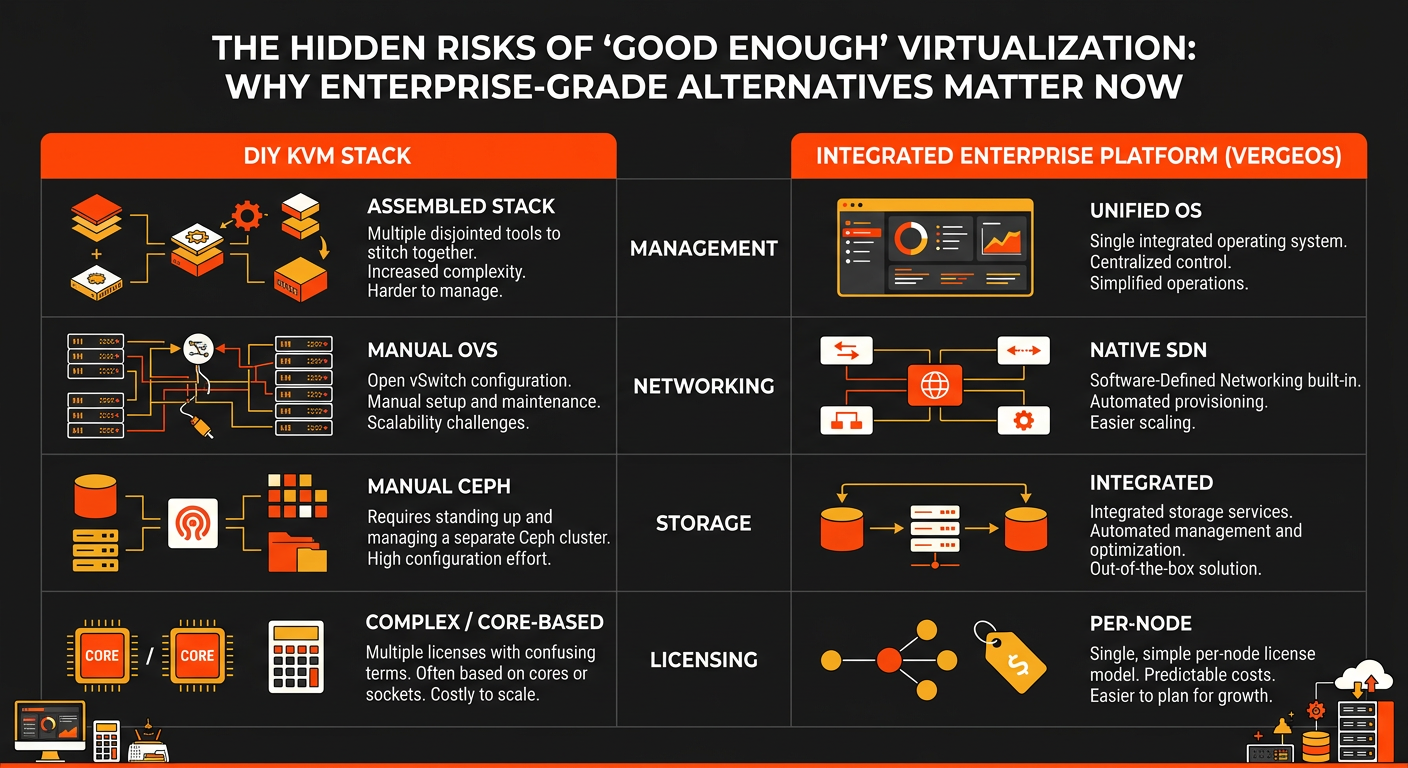
Some specific things that matter in practice:
Native SDN without the NSX tax. Software-defined networking is built into VergeOS. No separate licensing, no bolt-on solution that needs its own expertise to operate. You get VLAN topology customization and tenant isolation without the procurement headache.
Snapshot granularity that's actually useful. Snapshots at the VM level, tenant level, and environment level — not just "take a snapshot and hope." When you're doing a migration or a risky config change, the ability to roll back at different scopes is genuinely valuable.
Per-node licensing. This one's a big deal post-Broadcom. VergeOS charges per node, not per core or per VM. As you scale your workloads, your licensing costs don't suddenly explode because you added more VMs to an existing node.
Nested tenants. For MSPs or enterprises with complex organizational structures, the ability to create isolated sub-tenants within tenants is something that's genuinely hard to replicate in a DIY KVM environment.
The Migration Question
One thing that holds a lot of teams back from moving off VMware (or off their KVM setup) is the migration complexity. And honestly, that concern is valid — migrations are risky, and the risk isn't always obvious upfront.
What's changed is that tool-assisted VM conversion from vSphere/ESXi has gotten much better. Network re-mapping, rollback at every stage, parallel validation — these aren't marketing promises, they're actual workflow features that make migration less of a white-knuckle experience. It's still work, but it's not the "cross your fingers and hope" situation it used to be.
At Bit Refinery, we run VergeOS on our bare metal infrastructure, which means customers get the benefits of enterprise virtualization without the overhead of managing the underlying hardware themselves. The combination of dedicated hardware and an integrated virtualization layer is kind of the sweet spot for data-intensive workloads — you're not fighting virtualization overhead, and you're not fighting your own operational complexity.
So When Does KVM Actually Make Sense?
Honestly? KVM makes sense when you have a strong Linux infrastructure team, relatively simple workloads, and the appetite to own your entire stack. Some organizations genuinely thrive in that model.
But if you're running multi-tenant environments, complex networking, or workloads where downtime is expensive — or if your team is already stretched thin — the "free" cost of KVM tends to get eaten up pretty quickly by operational overhead, incident response time, and the engineering hours spent on things that should just work.
The Broadcom/VMware situation shook a lot of enterprises loose from their comfortable assumptions about virtualization. That's actually a good thing, even if the timing was painful. It forced a real conversation about what "good enough" actually costs.
The Bottom Line
Enterprise-grade virtualization isn't about paying for a logo. It's about integrated architecture, real support, and operational simplicity that lets your team focus on the work that actually matters to the business.
If you're in the middle of evaluating your virtualization strategy — whether that's a VMware migration, a KVM reassessment, or just figuring out what the right foundation looks like — we're happy to talk through it. Reach out at bitrefinery.com/contact and let's figure out what actually makes sense for your workload.