
LM Studio Shipped Something Interesting
On July 16th, 2026, LM Studio launched Bionic — a separate desktop app for Mac and Windows that turns open models into a working agent. Code projects with agentic repo search and inline diffs, Work projects for PDFs and spreadsheets with automatic checkpoints, native web search, offline voice transcription via Mistral's Voxtral. It's targeting models like GLM 5.2 and Kimi K2.7 Code. Genuinely interesting stuff.
But most of the coverage glossed over something important about the architecture. So we just... ran it. On real hardware. And took notes.
The Architectural Detail Everyone Missed
Here's the thing: Bionic does not accept a custom OpenAI-compatible base URL. You can't just point it at your own inference endpoint the way you'd do with Open WebUI or a dozen other frontends. A Bionic session has exactly three options: LM Studio Secure Cloud, a local model, or a remote model via LM Link.
LM Link is a Tailscale-based mesh — built with Tailscale, runs in userspace — that joins your Bionic client to llmster, LM Studio's headless Linux daemon running on your GPU box. That's the only supported path to your own hardware. Not a reverse proxy, not a custom URL, LM Link.
One more thing worth being upfront about: LM Link is free for the duration of the Preview period, with paid plans coming at GA. That's a real dependency to keep an eye on. We'll come back to it.
What We Actually Set Up
We installed llmster 0.0.19-2 on an Ubuntu 24.04 box: single NVIDIA RTX 6000 Ada 48 GB (49,140 MiB, driver 595.71.05, CUDA 13.2), 8 vCPU, 62 GB RAM. llmster auto-selected the CUDA runtime — llama.cpp-linux-x86_64-nvidia-cuda12-avx2@2.24.0 — which was a nice touch, no manual configuration needed.
We pulled qwen/qwen3-coder-30b, a 30B-total / 3B-active MoE model, 18.63 GB GGUF. It loaded at 131,072 context in 7.83 seconds.
Honest caveat: a 4B vision classifier was already running on the card the entire time, holding 9,854 MiB. So these aren't clean-card numbers. They're shared-card numbers. Which, honestly, is probably closer to how most people will actually run this.
Finding 1: The Built-In Estimator Will Lie To You
Before loading, we ran lms load --estimate-only. It reported 17.35 GiB at 32K context, at 128K context, and at 256K context — the same number every time, with confidence flagged as LOW.
Measured reality at 128K: VRAM went from 9,854 MiB to 40,443 MiB. Model plus KV cache = 30,589 MiB (~29.9 GiB). That's roughly 72% above the estimate. About 12.5 GiB of that gap was KV cache at 128K context — which the estimator simply doesn't model.
The takeaway is blunt: size your hardware from measurement, not from that estimator. It'll tell you everything fits. It's wrong.
Finding 2: The Throughput Curve Is What Matters for Agentic Work
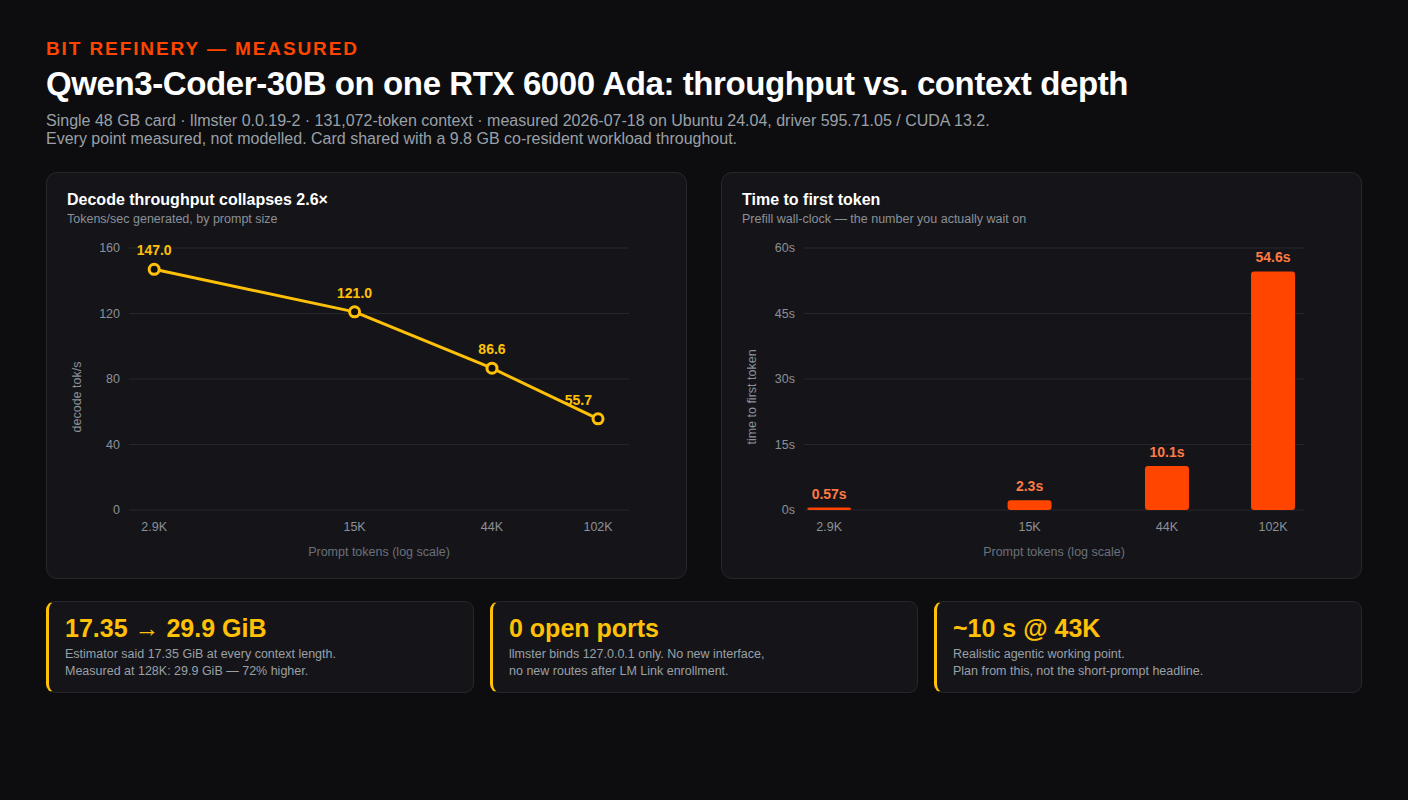
Most benchmark posts quote tok/s at empty context. That's the best-case number, and it's not the number that matters for an agent working through a real codebase. Here's what we actually measured, streaming:
| Context | Prefill | Prefill tok/s | Decode tok/s |
|---|---|---|---|
| 2,934 tokens | 0.57 s | 5,177 | 147.0 |
| 14,534 tokens | 2.26 s | 6,443 | 121.0 |
| 43,534 tokens | 10.05 s | 4,332 | 86.6 |
| 101,534 tokens | 54.64 s | 1,858 | 55.7 |
Short prompts (the empty-context happy path): TTFT 0.09–0.12 s, decode 158–172 tok/s. Looks great in a tweet.
Decode degrades 2.6x — from 147 tok/s down to 56 tok/s — going from 3K to 100K context. Prefill throughput peaks near 14K tokens then falls off hard.
The 43K row is the realistic one for an agentic coding session — that's where you are when Bionic has indexed a real repo and is working through it. Ten seconds to first token and 86.6 tok/s decode. That's the number to plan around, not the 172 tok/s you'll see quoted elsewhere. Under load the card drew 219.8 W against a 300 W cap, sat at 69°C. Perfectly stable.
Finding 3: LM Link Enrollment Has Two Gotchas
This is the part where we spent an embarrassing amount of time staring at a terminal.
LM Link is in Preview and rolls out in batches. A fresh account doesn't have it by default. We ran lms link enable and got: "LM Link enabled, but you do not have access." Great. You have to enable it per-account in the LM Studio web dashboard first.
Okay, fine, did that. Went back to the CLI. Still refused. Same error.
Turns out — and this is in absolutely no documentation we could find — the daemon caches the entitlement at login. After enabling it in the browser, the CLI doesn't know about it until you restart the daemon. lms daemon down && lms daemon up fixed it immediately:
LM Link enabled. Connecting...
LM Link is now online.
One account allows 5 devices. Minor UI quirk: the web dashboard still showed "No devices linked yet" after the CLI had already reported Online. Bit of a lag in the UI sync. Not a big deal, just mildly disorienting.
Finding 4: "No Open Ports" Is Literally True
This was the part that genuinely impressed us. After the box was enrolled and online in the LM Link mesh, we checked the host's networking. Nothing had changed:
ip -br addr: onlylo,enX0,enX1. Notailscale0, no new interface.ip route: unchanged, just the two kernel subnet routes.ss -tunlp: llmster bound to127.0.0.1:1234and127.0.0.1:41343only. Nothing on0.0.0.0.
The Tailscale mesh runs entirely in userspace, inside the llmster process. Your remote GPU becomes reachable from your laptop without opening a single firewall port, without a reverse proxy, without touching the host's network config at all.
You can verify this yourself in three commands. That's the part worth stealing as a pattern even if you never run Bionic.
Does the Model Actually Work?
We handed it a Go fan-in function that leaks goroutines. It correctly identified the missing close(out) and returned the canonical sync.WaitGroup plus closer-goroutine fix. Quantization wasn't degrading usable output. That's a real check, not a synthetic benchmark.
What This Means for Hardware Sizing
Let's be honest about the models Bionic actually headlines. GLM 5.2 is 744B parameters — roughly 372 GB at INT4. Kimi K2.7 Code is 1T, roughly 339 GB at Q2. A fully loaded 7x 48 GB pod gives you 336 GB of VRAM — that's under both of those models before you've allocated a single token of KV cache. The tier those models need is LM Studio Secure Cloud or an H100-class multi-node deployment. We're not going to pretend otherwise.
What does run beautifully on a single 48 GB card is the 30B-A3B coding tier we measured. And honestly? That's the tier most people will actually drive from Bionic day to day. The frontier models are impressive benchmarks. The 30B MoE is what you'll have a tab open with at 2pm on a Tuesday.
For that workload, dedicated GPU hosting makes a lot of sense. Bit Refinery's Private GPU Cloud offers single-tenant NVIDIA GPU VMs with full root and SSH access — RTX 6000 Ada 48 GB from $790/month and RTX PRO 5000 Blackwell 48 GB from $840/month, up to 7 GPUs per pod with NVLink. Flat monthly billing, no per-second metering, $0 egress fees with 10 TB included. Tier 3 data centers in Denver and Seattle, with free private peering to Google Cloud from Denver.
The privacy argument here is structural, not a marketing promise. Weights, prompts, and your entire repo context stay on hardware you control. Nothing is retained or trained on because nothing leaves your environment. With LM Link's userspace networking, the attack surface is genuinely minimal — we checked.
The Actual Recommendation
If you're sizing hardware for Bionic with a 30B-class coding model, use the 43K-context row as your planning baseline — that's the realistic agentic working point, not the empty-context best case. Budget roughly 30 GiB of VRAM for a 30B model at 128K context (we measured 29.9 GiB on a shared card; a clean card will be similar). The estimator will tell you 17 GiB. It's wrong.
Spec a pod at Bit Refinery's Private GPU Cloud page — a single RTX 6000 Ada handles this workload cleanly, and you can scale to 7 GPUs if you want to run larger ensembles or multiple models simultaneously.
One last thing: keep an eye on LM Link's Preview pricing. The zero-cost period is genuinely useful right now, but the moment paid plans land at GA, the calculus on self-hosted vs. Secure Cloud shifts. Worth knowing before you build a workflow around it.