A long form guide is going around right now: buy a Mac mini, run a 30B model on it locally, get roughly 40 tokens per second, cancel your AI subscription. It is well written, and the author is honest about the limits. He says frontier work still belongs in the cloud. He recommends keeping one paid subscription for the hard 20 percent of tasks. He never tells you to run your company on it.
For one developer, that advice is mostly right, and we are not going to argue with it.
The problem is what readers take away. The guide measures one thing and most people hear another, and four gaps do the damage:
- Every number in it is batch size one. One person, one question, one answer at a time.
- It quotes generation speed, not prefill. The wait before the first word is the half nobody publishes.
- The memory cap sets your model class, and buying a second box does not raise it.
- There is no operations story at all, which is fine on a desk and gets expensive in a business.
We host dedicated graphics processing units (GPUs) for companies, so we have measured numbers on the other side of this comparison. Here is what they say.
1. Every local AI benchmark you have read is batch size one
"40 tokens per second on a 30B model" describes one person, typing one question, waiting for one answer. That is the whole test. It is a real number, and it describes a real experience: yours, alone, at your desk.
It tells you very little about what happens when a second person shows up.
Single stream throughput does not divide evenly across users. It degrades, and how gracefully it degrades depends almost entirely on whether your serving layer does continuous batching, meaning it interleaves many in flight requests through the GPU instead of finishing them one at a time. That is what vLLM, SGLang and TensorRT-LLM exist to do. In most cases it is the difference between a box that serves a team and a box that serves a person.
Apple's unified memory is genuinely good engineering for capacity. It is how a small machine holds a 30B model at all. But the local inference stacks people actually run on a mini are tuned for one session, and there is no continuous batching story there comparable to what a datacenter card gets for free.
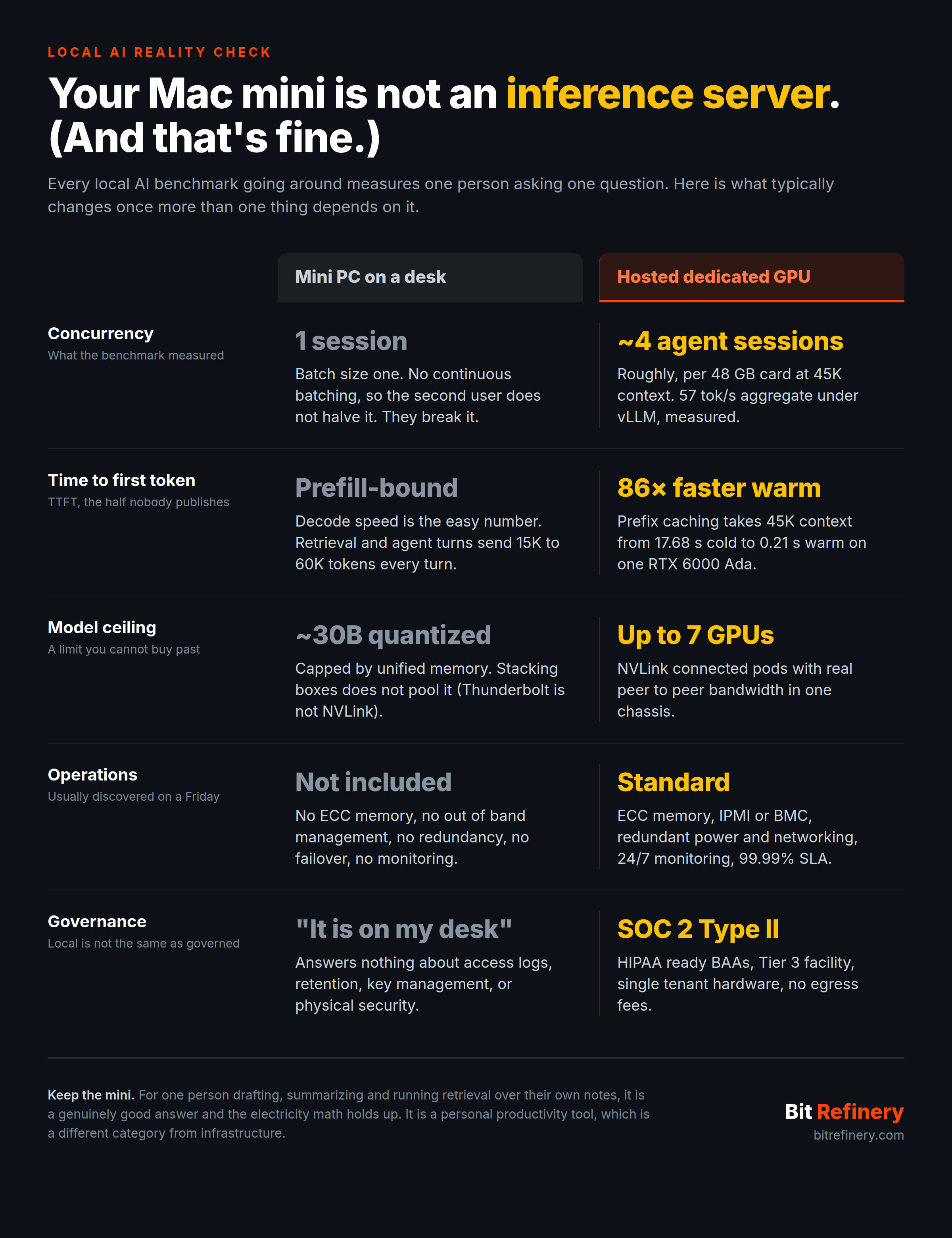
We measured our side of it. A single RTX 6000 Ada (48 GB) under agent shaped load at 45,000 tokens of context peaked at 57 tokens per second aggregate across four concurrent sessions on vLLM. The same card, running the same model under llama.cpp, managed 8.5 tokens per second aggregate while failing half the requests, because its key value (KV) cache pool was shared across all slots rather than sized per session. Same silicon, same weights, a 6.7x spread, decided by the serving layer alone. (Full method and tables are in our serving layer benchmark, including the part where we had it backwards and llama.cpp turned out to be the brittle one.)
None of that travels from a personal box to a shared one. A single user number and a concurrency number are not the same product, and the "cancel your subscription" framing quietly puts them side by side.
2. Generation speed is the easy half of the measurement
The second thing almost nobody publishes is time to first token (TTFT), the wait between hitting enter and seeing a word.
Token generation, the text scrolling out, is the cheap part. Prefill, where the model reads everything you gave it before producing anything, is the expensive part. It is compute bound, it scales with how much context you sent, and it is typically where consumer hardware sits furthest from a datacenter GPU.
From the same benchmark, one session, cold (the first turn of a conversation):
| Context | TTFT, cold | TTFT, warm cache | Decode tok/s |
|---|---|---|---|
| 3K | 1.00 s | 0.05 s | 193.8 |
| 15K | 3.85 s | 0.08 s | 153.4 |
| 45K | 17.68 s | 0.21 s | 98.6 |
| 100K | 74.13 s | 0.38 s | 60.8 |
Look at the last column against the second one. Decode speed barely moves, and decode speed is the number everyone quotes. Cold time to first token goes from one second to seventy four.
That gap explains why local setups feel quick in a demo and slow in practice. A chat message is about 500 tokens, and it is all decode. Retrieval augmented generation (RAG) over your document set, a large source file, or any agent turn resending its accumulated history runs 15,000 to 60,000 tokens every turn, and that is mostly prefill.
So if a guide gives you tokens per second and no time to first token, it measured the half that does not hurt.
3. The memory cap sets your model class, and a second box will not help
The memory ceiling is the part worth thinking hardest about. A mini that tops out in the 48 GB range means the largest model you can usefully run is a quantized 30B class one. That is a good summarizer, a good classifier, and a reasonable code assistant on small files.
In most cases it is not what a team means when it says "our AI stack."
Stacking minis does not solve it either. You cannot pool memory across separate machines at any speed worth having. Tensor parallelism assumes NVLink or PCIe class bandwidth between chips in one chassis, and two minis on Thunderbolt or Ethernet are two computers, not one larger one. That limit is architectural, so no amount of buying moves it.
(One caveat on the guide itself: we have not independently checked its 2026 Apple pricing or memory cap figures. Plausible given the current memory market, but check the configurator before you budget around them.)
4. The operations story is missing, and that is the expensive part
This is the section every local AI post skips, and in every environment we have seen it is the one that eventually costs someone a weekend.
A mini under a desk typically has:
- No error correcting code (ECC) memory, so silent bit flips in 20 GB of resident weights are simply a thing that can happen.
- No out of band management (IPMI or a baseboard management controller), so when it wedges, somebody drives in.
- No redundancy. One power supply, one disk, one machine, one of everything.
- No failover, monitoring or backup, unless a person builds all three and then keeps maintaining them.
- Consumer power and cooling, three feet from someone's desk, in a room that is not temperature controlled at 3 a.m. on a holiday weekend.
That is all fine for a personal tool. As the machine a company depends on, it is an outage waiting to be discovered on a Friday afternoon.
There is a compliance version of the same mistake, and it catches teams by surprise. "The data stays local" is not the same claim as "the data is governed." An auditor will ask about access logs, retention, key management, physical security and who can walk up to the machine. "It is on my desk" answers none of those, and it is not a strong answer to the last one either.
5. Where the guide is right, and it is right about a lot
For one person doing drafting, summarizing, classification and question answering over their own notes, a Mac mini is a genuinely good answer. The electricity math holds up. The privacy story is real for that use case. Nobody should talk you out of it.
That is a personal productivity tool, and a good one. It sits in a different category from infrastructure, which is the same conclusion we reached about AMD's $1,500 "AI lunchbox" last year (great for one person, wrong shape for a business workload). The vendor keeps changing. The line between the two categories does not.
6. What changes once more than one thing depends on it
The moment inference has more than one consumer, whether that is teammates, a production endpoint, a nightly batch job or a handful of agents, the requirements invert. You stop optimizing for peak single stream speed and start optimizing for throughput under concurrency, predictable tail latency, and being able to sleep through the night.
| Mini PC on a desk | Hosted dedicated GPU | |
|---|---|---|
| Number that matters | Single stream tokens per second | Aggregate throughput and p95 TTFT |
| Concurrency | One session, degrades sharply | Roughly 4 agent sessions per 48 GB card at 45K context, measured |
| Prefill | Compute bound, no real fix | 2x faster on vLLM than llama.cpp on the same card, plus prefix caching |
| Model ceiling | About 30B quantized, cannot pool across boxes | Up to 7 NVLink connected GPUs in one pod |
| Memory | Consumer, no ECC | ECC throughout |
| Management | Walk over to it | IPMI or BMC, full root and SSH, 24/7 monitoring |
| Resilience | One power supply, one disk | Redundant power, cooling and networking, 99.99% SLA |
| Governance | "It is local" | SOC 2 Type II, HIPAA ready BAAs, Tier 3 facility |
| Cost shape | One time hardware purchase | Flat monthly, 10 TB egress included, no overage |
The sizing rule in the second row is not marketing. It is what we measured, and it surprised us: budget roughly four concurrent agent sessions per RTX 6000 Ada at realistic context depth, because the wall you hit is prefill compute rather than video memory. We never exhausted the KV cache pool. We ran out of the ability to read prompts quickly enough.
Knowing that number ahead of time is the difference between provisioning correctly and finding out in production.
The split most teams land on
Keep the mini. For personal drafting, local RAG over your own notes, and the private by default work you would rather not paste into anyone's application programming interface (API), it earns the desk space.
Then put the shared workload on hardware built for shared workloads: dedicated GPUs, ECC memory, a serving layer that batches properly, redundant power, and somebody whose job it is to notice when it breaks.
Those are not competing strategies. They are two different problems that happen to load the same model file.
If you are running into the concurrency wall on a local box, we are happy to talk it through. We host single tenant NVIDIA hardware at flat monthly pricing with no egress fees, and we will size it against your actual context lengths rather than a batch size one benchmark. If you already own the cards, BYOGPU puts them in our facility instead.