Look, we've all been there. You start with a small AWS instance, then add another, then suddenly you're looking at a $15,000 monthly bill and wondering where it all went wrong. The cloud promised infinite scalability and pay-as-you-go pricing, but somewhere between "getting started" and "holy crap we're spending how much?" the math stopped making sense.
There's a better way, and it's not about abandoning the cloud entirely—it's about being strategic. We call it "own the base, rent the spike," and it's saved our customers anywhere from 40% to 70% on their infrastructure costs. Let me show you how three real companies made it work.
The Problem with All-Cloud Infrastructure
Before we dive into the examples, let's talk about why the hyperscale cloud model breaks down for established companies with predictable baseline workloads.
When you're running production systems 24/7/365, you're not really "renting" anything—you're effectively buying compute at retail prices with a monthly subscription. An r6i.metal instance on AWS (similar specs to our Gold tier) costs around $8,600/month just for the compute. Add storage, backups, and data transfer, and you're easily over $10,000.
But here's the kicker: egress fees. If you're moving 200 TB of data per month (not uncommon for analytics workloads, video processing, or backup systems), that's another $16,200 in AWS egress charges at $0.09/GB. For data that's just... leaving your infrastructure. It's like paying a toll every time you drive out of your own driveway.
Customer Example #1: The Ad Tech Platform
The Situation
This customer runs real-time bidding infrastructure for programmatic advertising. Their baseline load is consistent—processing about 50 million bid requests daily, storing 180 days of historical data for reporting and ML model training.
Their AWS setup included:
- 4x r6i.2xlarge instances for bid processing
- 40 TB of EBS storage for historical data
- 150 TB/month average data transfer (reports, ML training datasets, client exports)
- Auto-scaling group that occasionally spun up 2-4 additional instances during peak hours
Monthly AWS cost: ~$12,400
The Hybrid Approach
We moved their baseline infrastructure to a single Bit Refinery Gold server:
- 80 cores, 1 TB RAM, 44 TB RAID6 SSD storage
- $2,800/month with unlimited 1 Gbps bandwidth (zero egress fees)
- Kept their AWS auto-scaling group for peak traffic spikes (4-6 hours daily)
- Used AWS Lambda for burst processing during campaign launches
New monthly cost: ~$4,200 total ($2,800 bare metal + ~$1,400 AWS for spikes)
Savings: $8,200/month (66% reduction)
The bare metal server handles their consistent baseline with room to spare. During peak hours, their load balancer routes overflow traffic to AWS instances that spin up automatically. Campaign launches still leverage Lambda for parallel processing of creative assets. They get the best of both worlds—predictable costs for predictable load, elastic scaling when they actually need it.
Customer Example #2: The SaaS Analytics Company
The Situation
This company provides embedded analytics dashboards for B2B SaaS products. They run ClickHouse for real-time query processing and store customer data in S3.
Their Azure setup:
- 2x Standard_E64s_v5 instances for ClickHouse (128 vCPUs, 864 GB RAM total)
- 60 TB Azure Blob Storage
- 300 TB/month egress (customer dashboard queries, API responses, data exports)
- Azure Functions for ETL pipelines
Monthly Azure cost: ~$18,700
Yeah, you read that right. The egress alone was costing them about $9,000/month.
The Hybrid Approach
We deployed:
- 2x Bit Refinery Silver servers for ClickHouse cluster (48 cores, 512 GB RAM each)
- MinIO object storage on dedicated bare metal (80 TB usable capacity)
- Total: $5,600/month for bare metal + MinIO
- Kept Azure Functions for serverless ETL (actually a good use case for cloud)
- Maintained small Azure Blob bucket for disaster recovery snapshots
New monthly cost: ~$6,800 total
Savings: $11,900/month (64% reduction)
Their ClickHouse queries got faster too, because there's no virtualization overhead on bare metal and NVMe storage is just... faster than network-attached block storage. The MinIO setup gave them S3-compatible APIs so their application code didn't change at all—they just swapped the endpoint URLs.
They still use Azure Functions because serverless makes sense for sporadic ETL jobs. But their always-on infrastructure? That's owned, not rented.
Customer Example #3: The ML Training Startup
The Situation
This one's a bit different because it involves GPUs. The company trains computer vision models for manufacturing quality control. Their workload is bursty—intense training runs for 2-3 weeks, then lighter inference and data prep for a week or two.
Their initial AWS approach:
- p4d.24xlarge instances (8x A100 GPUs) on-demand during training runs
- $32.77/hour = $23,600 for a 30-day month if running continuously
- In practice, they were spending $15,000-$18,000/month because they'd shut down between runs
- S3 storage for datasets: ~$2,000/month
Monthly AWS cost: $17,000-$20,000 (highly variable)
The Hybrid Approach
They purchased 4x NVIDIA RTX 4090 GPUs and shipped them to us for our BYOGPU colocation service:
- $2,400/month for 4-GPU colocation (includes power, cooling, networking, management)
- Kept AWS p4d instances available for emergency scale-out (never actually needed them)
- Moved datasets to MinIO on shared storage: $400/month
New monthly cost: ~$2,800/month
Savings: $14,200-$17,200/month (70-85% reduction)
Now here's the interesting part—their training runs actually got more efficient. With dedicated GPUs, they weren't competing with noisy neighbors or dealing with AWS's occasional instance unavailability. They could leave experiments running overnight without worrying about hourly costs adding up.
The "rent the spike" part? They kept their AWS account active with pre-configured p4d launch templates. If they ever need to scale beyond 4 GPUs for a massive training run, they can spin up cloud instances in minutes. They just haven't needed to yet.
The Pattern That Emerges
Looking at these three examples, you'll notice a pattern:
- Baseline workloads moved to bare metal – Anything running 24/7 with predictable resource needs
- Egress-heavy workloads moved to bare metal – Data transfer costs disappear with unlimited bandwidth
- Cloud kept for actual elasticity – Auto-scaling, serverless functions, true burst workloads
- Hybrid architecture, not replacement – It's not either/or, it's both
The companies that save the most are the ones with:
- Consistent baseline compute needs (not everything is a Black Friday spike)
- High data transfer volumes (analytics, backups, media delivery, ML datasets)
- Storage-heavy workloads (databases, object storage, time-series data)
- Workloads that benefit from dedicated resources (databases, GPU training, real-time processing)
The Math is Simple, Actually
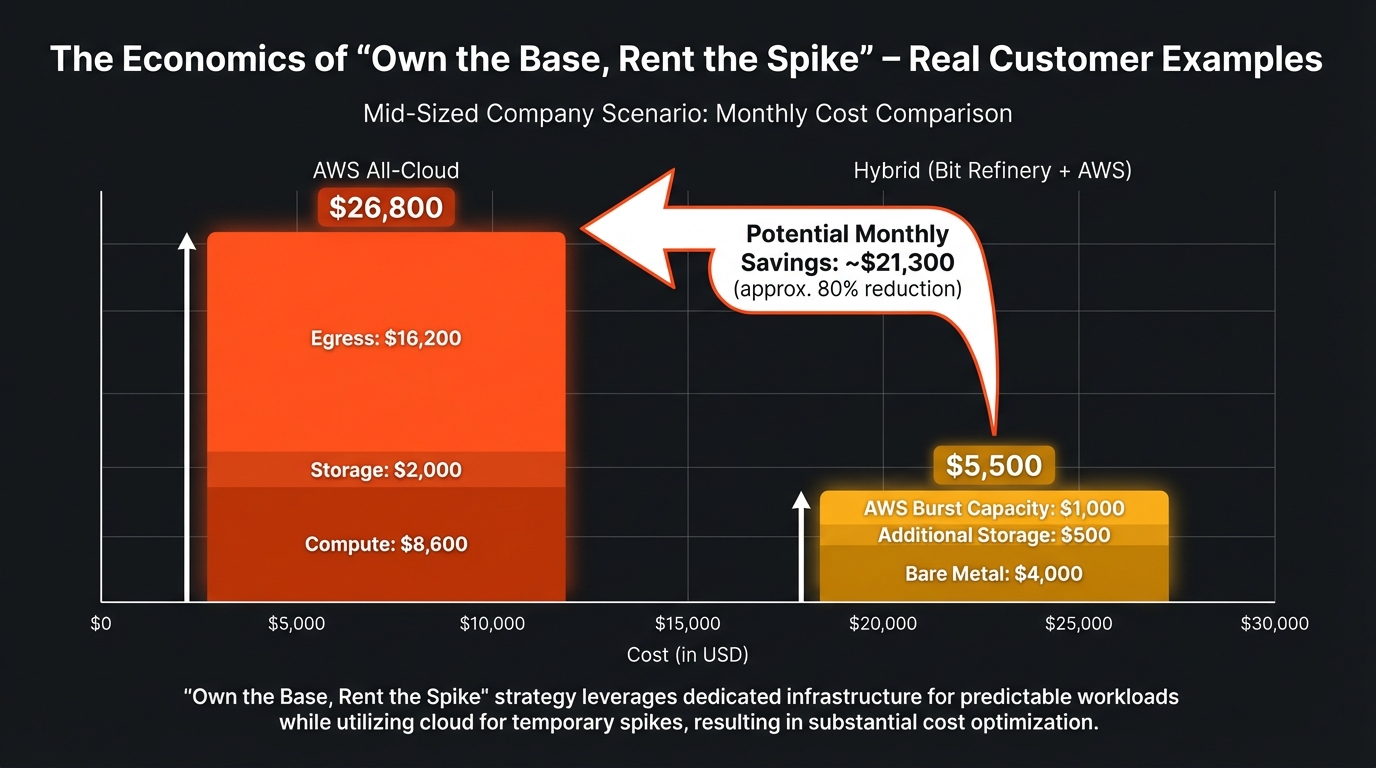
Let's do some napkin math for a typical mid-sized company:
Scenario: 200 vCPUs, 1.5 TB RAM, 50 TB storage, 200 TB/month egress
AWS equivalent:
- Compute: ~$8,600/month (r6i.metal or equivalent Reserved Instances)
- Storage: ~$2,000/month (EBS)
- Egress: ~$16,200/month (200 TB × $0.09/GB after free tier)
- Total: $26,800/month
Bit Refinery Platinum + AWS for spikes:
- Bare metal: $4,000/month (80 cores, 3 TB RAM, 150 TB storage, unlimited egress)
- Additional storage: ~$500/month if needed
- AWS for burst capacity: ~$1,000/month (occasional auto-scaling)
- Total: $5,500/month
Savings: $21,300/month, or 79%
Now obviously your mileage will vary—if your workload is truly unpredictable or you're a three-person startup, all-cloud might still make sense. But if you're past the "figuring things out" stage and into the "we know what our baseline looks like" stage? The math gets pretty compelling.
What About the Operational Overhead?
I can hear the objection already: "Sure, but managing bare metal is a pain."
Fair point, except... we manage it for you. Our customers get:
- 24/7 monitoring and support
- 99.99% uptime SLA
- SSH, IPMI, and VPN access within 48 hours of server provisioning
- Automated backups and disaster recovery options
- Direct engineer access (no tier 1 support runaround)
One of our ClickHouse customers put it this way: "We went from managing AWS cost optimization spreadsheets to just... running our database. The mental overhead savings alone were worth it."
Getting Started
If you're spending $10,000+ per month on cloud infrastructure and at least half of that is baseline workload (not actual spikes), it's worth running the numbers.
Here's how to start:
- Audit your current spend – Break it down by compute, storage, and egress
- Identify your baseline – What's running 24/7 regardless of traffic?
- Calculate your egress costs – This is usually the biggest surprise
- Model a hybrid approach – Keep cloud for what it's good at, own the rest
- Run a 3-month pilot – Move one workload to bare metal, measure the results
We're happy to help with the analysis—no sales pitch, just real numbers. Because honestly, if the math doesn't work for your specific situation, we'll tell you. But for most established companies with predictable workloads and heavy data transfer? The economics are pretty straightforward.
Want to see how the numbers work for your infrastructure? Contact us for a no-obligation cost analysis. We'll compare your current cloud spend against a hybrid approach and show you exactly where the savings come from.
Because at the end of the day, infrastructure should be a tool that helps you build your product—not a budget line item that keeps you up at night.